


Robot Vacuum Mops USA
Add a review FollowOverview
-
Sectors EYE
-
Posted Jobs 0
-
Viewed 382
Company Description
11 Methods To Redesign Completely Your Robot Vac
Features to Look For in a Robot Vacuum
If you have a large house and three shaggy dogs or just a chic apartment, you can keep your floors looking great with the aid of a robot vacuum. Be aware of these characteristics when choosing a robot vac for your home.
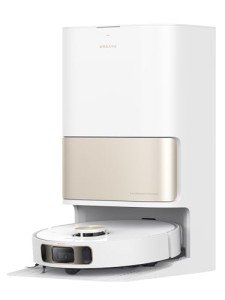 Some smart models create an electronic map of your home to guide your cleaning process. This can save time and provides a complete coverage. Apps that allow you to organize cleaning time and create no-go zones are a great option.
Battery Life
The battery is at the heart of every robot vacuum and its life expectancy directly affects the time it takes to clean. Typically, a good model with high-performance will last between three and five years before it requires replacement. However, this lifespan can differ based on various factors such as usage, maintenance, and the type of battery being used.
Charge and discharge cycles can degrade lithium-ion batteries over time. This degradation results in decreased time between charges, longer times before a robot cleaner returns to its dock, and also overheating. To avoid these issues, make certain to recharge your device at least once every three months and keep it in a cool, dry area. Also, make sure that the power switch is always in the off position in the event that it is available, to avoid accidental or unintentional activation.
Certain models come with an indicator for battery health that notifies you when the battery is beginning to fail. This can help you schedule a replacement before the robot runs out of power. Many robots compatible with apps allow you to set virtual zones and barriers that allow you to draw lines or mark areas where you don’t want the vacuum to go. These features can reduce battery consumption and prolong the life of your robotic cleaner.
Genuine parts bought from a reliable source will also prolong the life of your robot vacuum. This will ensure that the parts are compatible with your specific model and are designed with a long-lasting design in mind. This will save you money and time on repairs and replacements in the future.
The best inexpensive robot vacuum robot vacuums have docking stations that allow the machine to go to its original position after recharging and continue cleaning exactly where it left off. This is especially useful when working in a space where the robot isn’t currently in use. To maximize the functionality, store the dock station where there is enough space on both sides and in front of it for the robot to have easy access to it.
App Control
A robot vacuum is a crucial smart home appliance that can make a big difference in your daily cleaning routine. Its advanced technology lets it automatically clean your floors when you’re at work or with other activities, making your home more relaxing and comfortable to relax. Additionally, it’s more efficient and convenient than traditional vacuum cleaners and requires less maintenance.
A powerful motor and sensors enable the robot vacuum to pick dust and debris, which is then sucked away into the dust bin for disposal. The suction power is powerful enough to scrub a variety of surfaces including carpets and hard floors. Some robot vacs are also designed to eliminate pet hair and other allergens from your floors.
The best robot vacuums use intelligent navigation systems that map your home and create efficient cleaning routes, avoiding obstacles and ensuring thorough coverage. Maps can be viewed in your app and set “no go zones” to block robots from entering certain rooms. The navigation system can also detect and avoid collisions with furniture or other objects, reducing the chance of causing damage.
Some robot vacuums have mopping functionality that can remove spots of soil and spills on a variety of surfaces. You can alter a range of parameters, including the amount mopping water and the suction power of the vacuum. You can also schedule and pause cleaning sessions through the app. In addition the app comes with various convenience features, like the ability to view the status of the battery and clean reports.
If you choose the model that has a camera you can also monitor your home with the app remotely turning off or on the robot vacuum and other smart devices in your house. This feature is a great way to monitor your children and pets when you are away.
Some robot vacs gather data about your family and make use of it to enhance their performance or provide new features, like voice activation. The privacy policies of these devices vary and you should be aware of them. The Home Robots app from Karcher for instance, protects data and stores it on servers in Germany. To safeguard your data, you will also receive regular security and software updates.
Cleaning Modes
The cleaning mode settings of a robot vacuum determine the performance. The motor powers the device to generate suction power and a combination of side brushes, roller brushes, and mops sweep debris into the path of the suction mechanism of the vacuum, to be sucked into the dust bin. Some premium models have mopping features that are edge-hugging, which allows the precise cleaning of corners. Other features include specialized pet modes to detect and avoid household pets, and smart turbo settings that increase the suction speed of the vacuum.
Mapping: Most robot vacs use advanced navigation systems that analyze the surroundings and create digital maps of your home which allows them to plan the route in a way that is efficient while avoiding obstacles and providing complete coverage. Certain models that are more advanced let you look at these maps through your mobile app and then target specific rooms or areas.
After the device has finished mapping, you can select the cleaning mode, such as standard or strong. The first mode uses maximum power, frequency, vacuuming, mopping and spraying to clean your floors. It is the best option for all scenarios, especially if you have hard floors and/or bare carpets. The second option is more affordable, but can still remove dirt from most surfaces. Eufy’s X10 Pro Omni, for instance, comes with an edge-hugging mopping mode that allows the mops at the rear of the robot to be closer to walls, making it easier to get to the edges of walls and other areas that are difficult to reach.
After completing its tasks, most robot vacs return to their docking station. This is due to sophisticated sensors and navigational systems that let devices remember their docks even if they are in a different room.
Some smart robot vacuums have the “smart-docking” feature that allows them to return on command to their dock, instead of waiting until their scheduled cleaning session. The iAdapt robotic vacuum by iRobot comes with this capability as do the majority of high-end models that have dToF laser navigation (developed from aerospace technology and utilized in self-driving cars). These systems scan the area with greater accuracy than ultrasonic or infrared sensor technologies.
Debris Collection
Robot vacuums are not designed to handle larger objects such as napkins or plastics, however they are able to handle most dirt on the surface. This is the reason they differ from mop systems for cleaning, which typically use microfiber pads and water to scrub floors.
Robots also have more sophisticated sensors that detect furniture, walls, and other obstacles to avoid collisions and improve cleaning paths. Others, such as the eufy S1 Pro, use the dToF technology that examines the surroundings with four times more precision than LDS (light detection technology). The dToF laser sensors can see the area in pitch black and can detect walls, furniture, carpeting and other items. This allows the eufy S1 Pro to work in an unlit room without relying on light sources which is an important feature for people suffering from allergies.
Another way that robots improve cleaning efficiency is to use an extra bin, which reduces the frequency of emptying. The majority of models can accommodate up to 2.5 gallons of debris, which is enough for a huge home. Furthermore, many robotics come with a hygienic, one-touch ejection mechanism that drives dust deep into the trash with just one motion.
Robot vacuums are compact and feature small battery packs that can be recharged to restrict their run time. Many are equipped with docking stations which serve as a home and charging point for the robot. When a robot vacuum is low in power, it automatically returns to its dock for charging before returning to the spot from where it left.
Some docking stations also feature a debris chamber that allows the user to manually take debris from the robot vacuum’s collection bin. The docking station’s trash disposal chamber is opened by a robotic vacuum using a lever, switch, or button. The docking station’s waste disposal chamber is able to be emptied using the use of a mechanical wand or gas pressure differential.
If you own an older model, it is important to dispose of a robot vac and its accessories with care to avoid harm to the environment or the health of humans. Batteries must be removed and taken to a waste management facility. The rest of the device is recyclable. Contact the manufacturer and your local municipality for specific programs, guidelines and facilities close to you.